Features

How Coreflux Routes connect PLCs, databases, APIs, and AI to your broker

Routes are the Douro bridges

How Coreflux Routes connect PLCs, databases, APIs, and AI to your broker

An episode of "Everything reminds me of Coreflux"

Porto and Vila Nova de Gaia are separated by the Douro River and connected by six bridges. Some are centuries old, others are fairly new. One is currently under construction. Each one was engineered for a different kind of traffic.

The Maria Pia, designed by Gustave Eiffel in 1877 for trains. The D. Luís I, finished in 1886, has a level for pedestrians and the metro and another for automobiles. The Arrábida, opened in 1963 for cars and had elevators. The São João, the Freixo, the Infante. Different protocols. Different infrastructure. All doing one job: getting across the river.

You don't need every kind of bridge. You need the one that fits the traffic you're crossing.

That's how integrations behave too. And it's why we built Routes.

Every system speaks its own dialect

If you've ever connected one system to another, you already know this. Every PLC has its own protocol. Every sensor sends data its own way. Every database wants SQL but politely. Every external service has its own API, its own auth, its own quirks.

The traditional answer is to glue them all together. A gateway server in the corner. A custom Node-RED flow. A Python script that runs on a Raspberry Pi under someone's desk, with a sticky note that says "do not unplug." By the time you've integrated five systems, you have five different integration approaches living in five different places, and the only person who knows where they all are has just gone on holiday.

We've been there. Routes are what we built when we wanted out.

One Manager, every connection

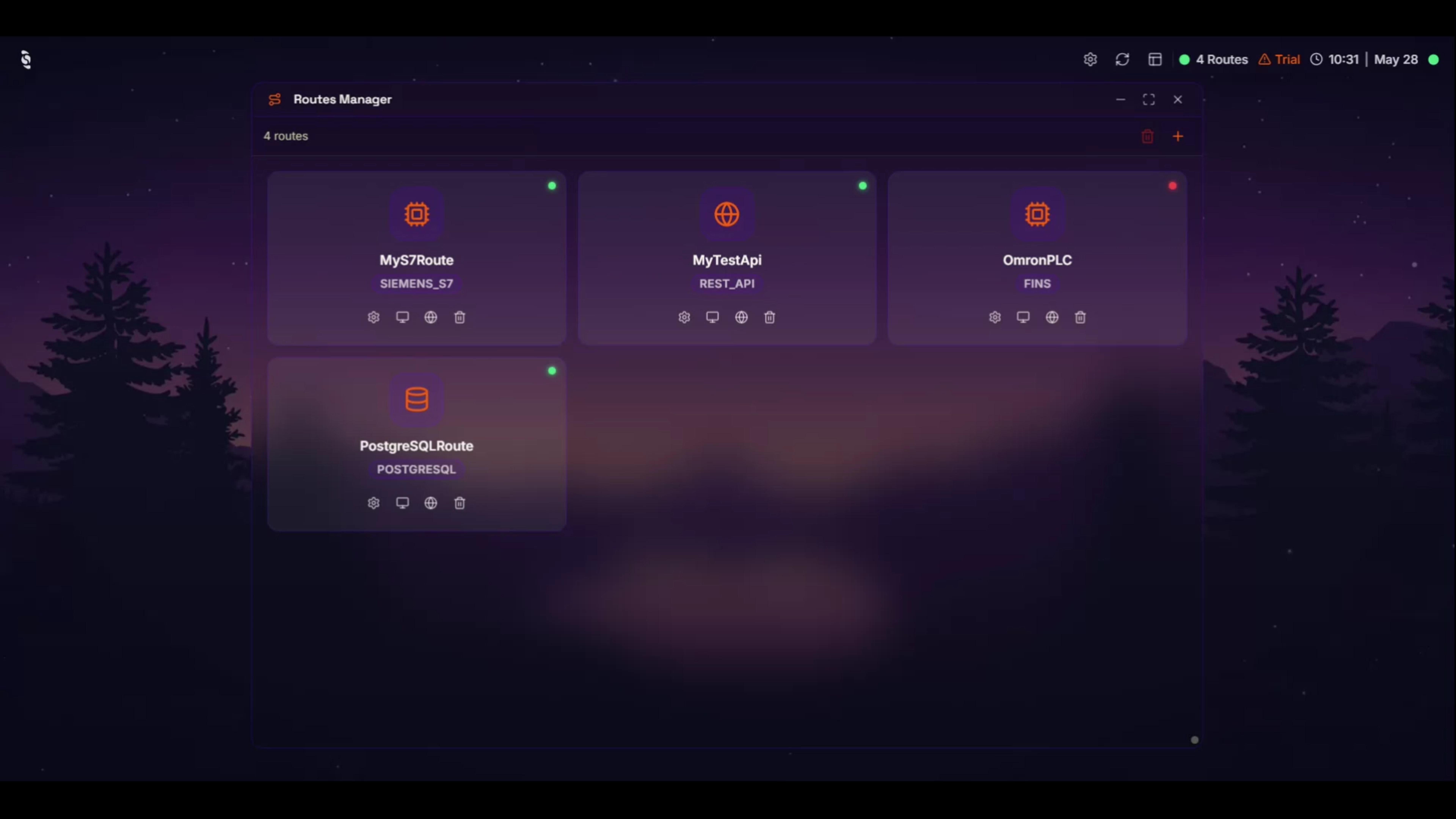
The Routes Manager is the map. Open it and you see every bridge your broker has, all in one place, with status indicators that tell you which are healthy and which need a look.

It's also where you build new ones. Templates for every kind of connection we support, ready to fill in:

Industrial protocols. 

Modbus TCP and Serial, Siemens S7 (200/300/400/1200/1500), OPC UA, ADS for Beckhoff TwinCAT, Allen-Bradley, EtherNet/IP, FINS for Omron. The full spread, native, inside the broker.

REST APIs. 

Two-way. The broker can call any HTTP endpoint. It can also expose endpoints for webhooks coming back.

Databases. 

PostgreSQL, MySQL, MongoDB, OpenSearch, Snowflake, InfluxDB, CrateDB. Connection pooling, retry, and error handling built in.

Data pipelines. 

MQTT bridges between brokers, email and SMS notifications, MQTT-to-REST forwarding.

System routes. 

Broker clustering and high availability configurations.

MCP. 

Connect to external tools and services through the Model Context Protocol.

AI agents. 

Autonomous AI assistants inside the route layer. They read topics, call tools, and take action. New in 2.0.

Media. 

Barcode scanning, video streaming at the edge.

Native means inside the broker. No separate middleware to install, no extra software to keep up to date, no extra license to manage. You add a Route, the broker handles the rest.

We call them Routes. They connect everything. Each one bridges Coreflux to something on the outside.

The Modbus moment

Nahuel walks you through the Routes Manager in the episode and demos two of these live.

The first is a Modbus route from a template. Click new, paste a few values and deploy. A couple of seconds later, a PLC is connected to the broker and the data is flowing into a topic. The whole thing fits in less than a minute. The point isn't that Modbus is glamorous. The point is that integrating a real device with a real protocol shouldn't be a multi-day project, and increasingly it isn't.

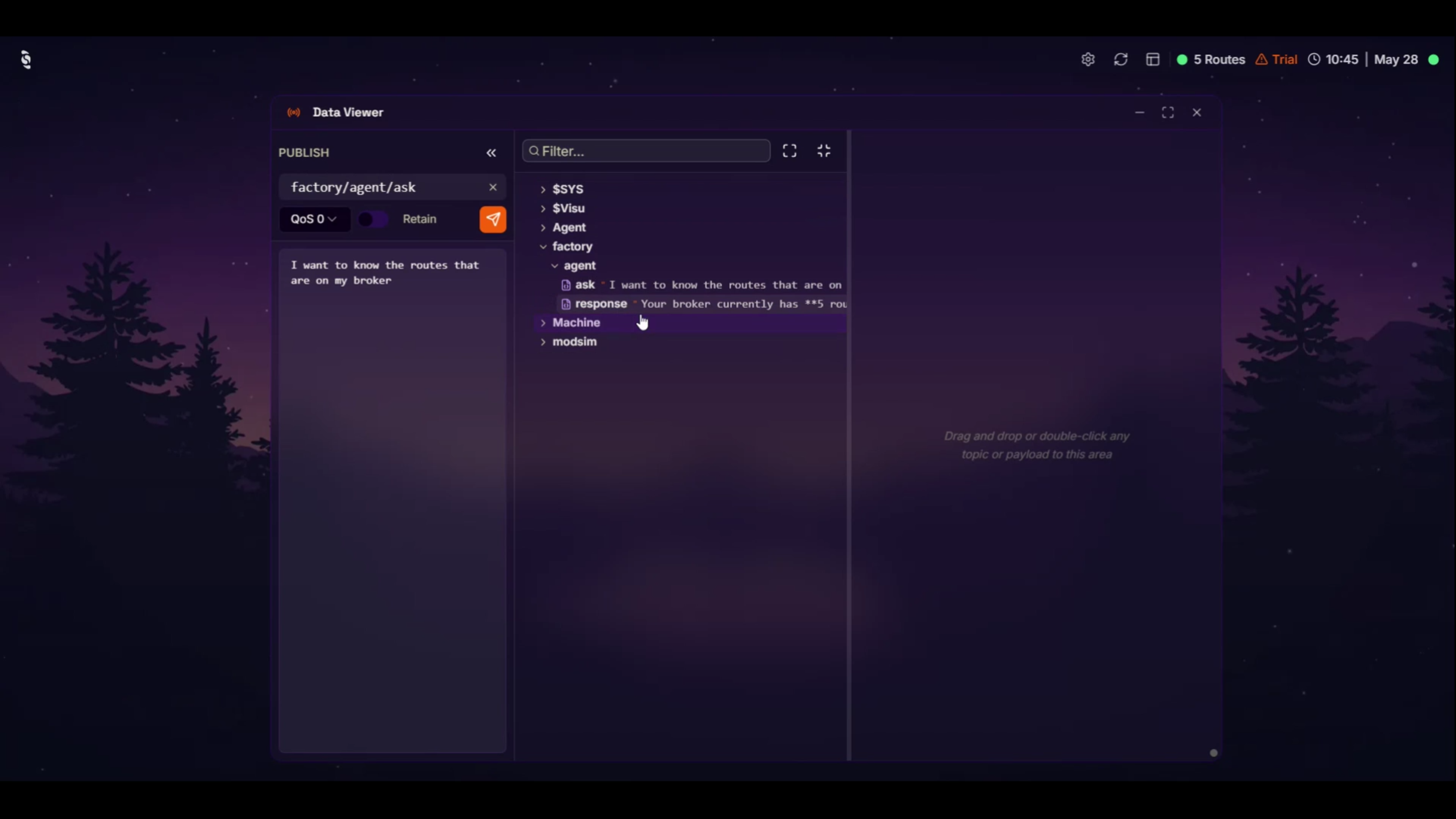
The second demo is an AI Route, which is the kind of thing that didn't exist a year ago. Same template flow. Deploy. Now the broker can think. Nahuel opens the Data Viewer, sends a prompt to a topic asking the AI agent how many routes are currently configured. A few seconds later, the agent replies, structured, accurate, in the same MQTT namespace as everything else.

The first demo is connectivity, as it has always been, just faster and in one place. The second demo is what becomes possible when the connectivity layer also understands what it's connecting.

The fundamental layer

Most platforms treat connectivity as plumbing. Important, but invisible, hidden behind whatever dashboard sits on top.

Routes are the opposite. They are the fundamental layer of Coreflux, alongside the broker itself. Without them, the broker has nothing to talk to. With them, you can connect anything to everything, and have it visible, configurable, and managed from one place.

Watch the episode

Nahuel, our full stack developer, walks through the Routes Manager and the two demos above in the second episode of Everything reminds me of Coreflux. João Barroso starts the conversation on a bridge over the Douro with a small orange toy car that may or may not have something to do with Nahuel's driver's license.

You can probably guess where that's going but you should still watch

Try Coreflux for free 👉 https://www.coreflux.org/

Recent Posts